OnlineMeeting subscriptions can be canceled at any time through your account settings. Subscription management is handled securely via our billing provider.
To cancel your subscription, follow the next steps:
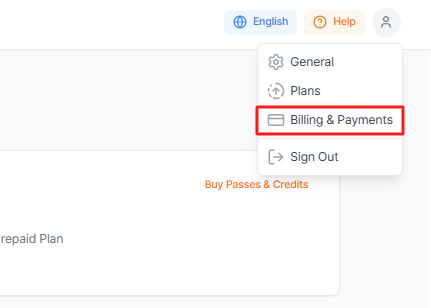
Click the profile icon in the top right corner of your screen.
Select Billing & Payments.
Under Manage your plan, click Open Customer Billing Portal.
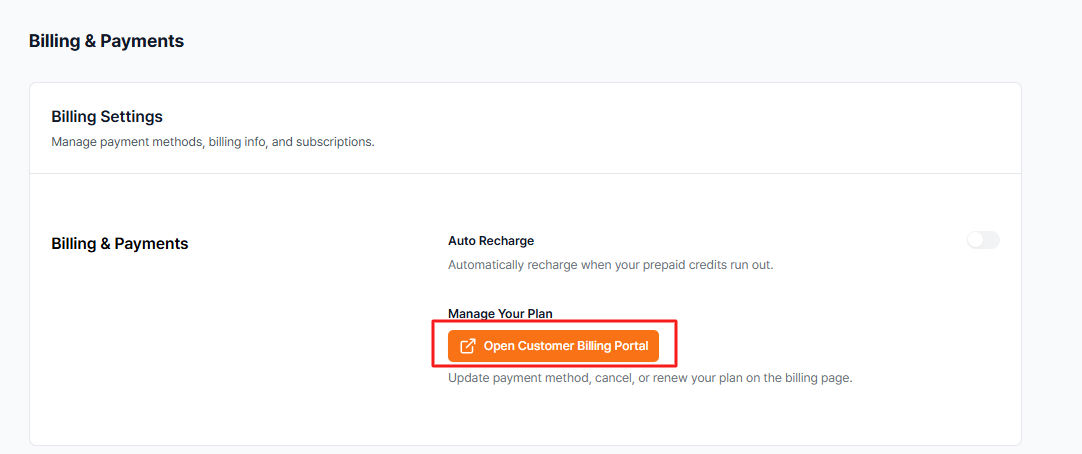
You will be redirected to your Stripe customer portal.
Click on Cancel subscription and confirm the cancellation.
Once completed, your subscription will remain active until the end of the current billing period.
Related articles:
If you require further assistance, please contact us at contact@eventcat.com.
Was this article helpful?
That’s Great!
Thank you for your feedback
Sorry! We couldn't be helpful
Thank you for your feedback
Feedback sent
We appreciate your effort and will try to fix the article